WordPress AI agent: what it is, what it can do, how to run one safely
A WordPress AI agent is an AI model that has been given tools for your site and permission to use them. That is the whole definition, and both halves matter: without tools it is a chatbot that describes what you should do; without permission boundaries it is a liability you would never point at a client site.
This guide covers what an agent is (and is not), what it can genuinely do on a WordPress site today, the permission model that makes it safe to run on production, and how to set one up. It assumes you have heard the word and want the substance.
Agent vs assistant vs chatbot
The three words get used interchangeably in marketing. They are not the same thing:
- Chatbot. Text in, text out. Knows nothing about your site beyond what you paste in.
- Assistant. Text in, text out, plus some context — your open file, your recent messages. Still cannot act.
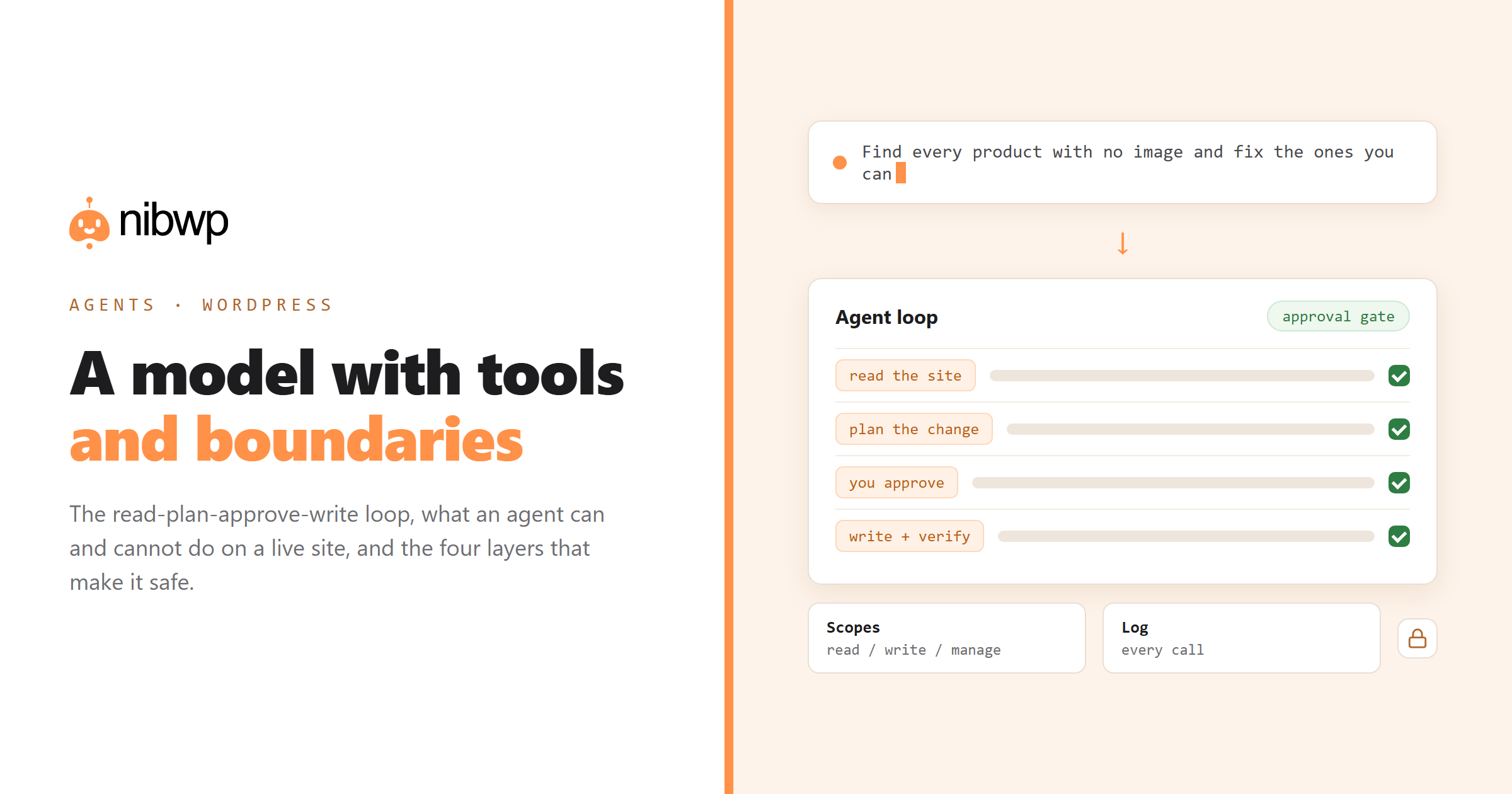
- Agent. Can call tools, observe the result, and decide the next step. It loops: read the site, form a plan, execute, verify, report. That loop is the difference.
A WordPress AI agent, then, is that loop pointed at your site. It reads through typed tools, plans a change, presents it, and — once approved — writes through the same tools, then reads back to confirm what happened.
What a WordPress AI agent can actually do
Grounded in real capabilities rather than demos, an agent connected through a WordPress MCP server can:
- Read anything you can read. Posts, pages, custom fields, taxonomies, media, users, plugin settings, order data, form entries — as structured data, not scraped HTML.
- Write with a plan. Create and update posts, products, fields, menus, redirects, translations, SEO meta — after showing you what it will change.
- Work in bulk. The same operation across hundreds of records, in batches, with progress and a summary.
- Operate plugins. WooCommerce, ACF, the SEO plugins, form plugins, LMS plugins, multilingual plugins — each through their own APIs, so their rules apply.
- Build in your page builder. Native Bricks, Etch, Elementor, Kadence or Breakdance output when a builder skill is installed — not pasted HTML.
- Answer questions from live data. “Which products have no image?” “What changed last week?” “Which forms send to an old address?”
The full inventory of what is callable is public: every WordPress ability an agent can call.
What it cannot do (and should not)
Being precise about the limits is what makes the capability trustworthy:
- It cannot invent facts about your business. If the content needs your offer, prices or positioning, you supply them.
- It cannot make design decisions well. It can execute a design system faithfully; it cannot decide the brand.
- It should not publish without review. Drafts and approval gates exist because judgement is not automatable.
- It cannot bypass your permission scopes. A read-only connection stays read-only no matter how the prompt is phrased.
- It cannot move money. Refunds, payouts and payments stay in the human path by design.
The permission model, layer by layer
Running an agent on a live client site is only reasonable because of four boundaries, and you should be able to name all four before you grant write access to anything:
- Scoped credentials. Connections are granted explicit scopes — read, write, manage, files, code. Grant the least you need; a read-only token is safe to hand to anyone on your team.
- Schema validation. Every tool call is checked against its schema before it runs. The model cannot smuggle an unexpected parameter through a well-phrased sentence.
- The approval gate. Writes are planned and shown first. This is where most mistakes get caught — usually yours, not the model's.
- The audit log. Every call recorded with tool, arguments, user and result. When a client asks what happened on their site, you answer with a record.
Add snapshots for anything bulk. One command before a large write means a bad run is a restore rather than an incident:
nibwp snapshot create --post-type product -o before.json
# ...run the bulk job, review the result...
nibwp snapshot restore before.json
Setting one up
The mechanics are short. On the site: install an MCP plugin and enable abilities. On your machine: connect a client. Then start read-only and widen when you trust it.
nibwp auth login https://client-site.com --scope read
nibwp agent add claude-code
# later, when you're ready for writes:
nibwp auth login https://client-site.com --scope read,write
Full walkthrough: connect your AI client to WordPress step by step. Client-by-client differences: which AI clients work with WordPress MCP.
Your first three jobs
Pick work where the agent's advantage is obvious and the risk is low:
- An audit. Read-only, no approvals needed, immediately useful: empty SEO meta, broken links, products without images, pages nobody links to.
- A bulk backfill. Alt text or meta descriptions across a whole library — high volume, low judgement, easy to review as a table.
- A repeatable report. The monthly maintenance sweep, written once and run on every site.
Each of those has a worked example with the exact prompts in the solutions library.
FAQ
What is a WordPress AI agent?
An AI model connected to your WordPress site through typed tools, with permission to read and — within scopes you grant — write. It loops: read the site, plan a change, get approval, execute, verify, report.
How is an AI agent different from an AI plugin?
A plugin adds fixed features in wp-admin. An agent works from your own AI client and can combine any of the site's tools into jobs the plugin author never designed, including multi-step work across plugins.
Is it safe to run an AI agent on a live WordPress site?
With the right boundaries, yes: scoped credentials, schema-validated tool calls, an approval gate on writes, and an audit log. Snapshot before bulk operations and start read-only on any site you care about.
Can an AI agent publish content automatically?
It can, technically, if you grant that. Best practice is drafts plus human review — publishing is a judgement call and the review step costs minutes while an unwanted publish costs credibility.
Which AI models can act as a WordPress agent?
Any model whose client speaks MCP: Claude, ChatGPT via connectors, Gemini, plus editor clients like Cursor, Windsurf and VS Code. The site side is model-agnostic — the tools are the same whichever model calls them.
Do I need to write code to use an AI agent on WordPress?
No. The setup is a plugin plus a one-time client connection, and the interface is plain English. Code helps if you want to script repeatable runs, but it is not required to get value.