What are Claude Skills, and how do they work with WordPress?
Claude Skills are folders of instructions that Claude loads on demand. Each one is a directory with a SKILL.md file — a few lines of YAML saying what the skill does and when to use it, then a body of procedural knowledge: the steps, the checks, the conventions, the scripts and reference files that turn a general-purpose assistant into a specialist at one job. Anthropic calls them Agent Skills; in Claude Code you see them as /skill-name commands; on claude.ai they are zip uploads under Settings. The important part for a WordPress team is simpler than any of that: a skill is how you stop re-typing the same twelve instructions every time you ask an AI to do the same job on a site.
This guide explains what Claude Skills actually are, how they load, where they run, and — the part that matters here — how they combine with WordPress. Skills are know-how. They cannot touch a site on their own. The touching happens through tools, and for WordPress that means an MCP server like NibWP, which exposes the site as 132 typed abilities an agent can call with your approval. Skills tell Claude how to do the job; NibWP is the thing it does the job with. Put the two together and you get repeatable, reviewable WordPress work.
What a Claude Skill is, concretely
A skill is a directory. The only required file is SKILL.md, and the only required content in it is YAML frontmatter with two fields: a name and a description. Everything else is optional — a body of markdown instructions, extra reference files, scripts that Claude can run. Anthropic's own example is a pdf-processing skill: the frontmatter says it extracts text and tables from PDFs and should be used when the user mentions PDFs, forms or extraction; the body says which library to use and how; a FORMS.md covers the form-filling edge case; a scripts/ folder holds a fill_form.py that does the deterministic part.
That shape — metadata, instructions, resources — is the whole idea. A skill is an onboarding document for an agent, written once and kept on disk, instead of a prompt you paste into a chat and lose.
- name — up to 64 characters, lowercase letters, numbers and hyphens. When a skill is uploaded to claude.ai or the API, the name cannot contain the reserved words “anthropic” or “claude”; in Claude Code, the directory name becomes the /command.
- description — up to 1,024 characters, and the single most important line you will write. Claude reads it to decide whether the skill applies to a request, so it has to say both what the skill does and when to use it.
- The body — step-by-step instructions, conventions, examples. Anthropic recommends keeping it under roughly 5,000 tokens and pushing detail into separate files.
- Bundled files — reference markdown, schemas, templates, scripts. They cost nothing until Claude actually reads or runs them.
How skills load: progressive disclosure
The design decision that makes skills work at scale is that they are loaded in stages, not all at once. Anthropic calls it progressive disclosure, and it has three levels:
- Level 1 — metadata, always loaded. At startup, Claude reads every installed skill's name and description into its system prompt. That costs about a hundred tokens per skill, which is why you can install dozens without a context penalty.
- Level 2 — instructions, loaded when triggered. When your request matches a description, Claude reads the SKILL.md body from disk. Only then do the instructions enter the context window.
- Level 3 — resources, loaded as needed. Reference files load only when the instructions point at them. Scripts run through bash and only their output enters context — the code itself never does.
For a WordPress team this is what makes a skill library practical. You can have a skill for care-plan audits, one for SEO meta backfills, one for WooCommerce catalog imports, one for each builder your shop uses, and a skill for how your agency writes a handoff document — and none of them cost anything until the moment one is relevant.
Where Claude Skills run
Skills are available across Claude's products, but they do not sync between them, and each surface has its own rules. The three you will meet:
- Claude Code. Skills are plain folders on disk: ~/.claude/skills/<name>/SKILL.md for personal skills, .claude/skills/<name>/SKILL.md inside a project for project skills, and plugins can bundle them. Claude discovers them automatically and you can also invoke one directly with /name. Claude Code adds extra frontmatter — disable-model-invocation to keep a skill manual-only, user-invocable: false for background knowledge, allowed-tools to pre-approve tools for that turn, context: fork to run it in a subagent, paths to activate it only for certain files. It has full network access, because it runs on your machine.
- claude.ai and the desktop app. Custom skills are uploaded as zip files through Settings, on Pro, Max, Team and Enterprise plans with code execution enabled. They are per-user — each team member uploads their own. Network access depends on your settings.
- The Claude API. Skills are uploaded through the /v1/skills endpoints and referenced by skill_id in a code-execution container. They are workspace-wide, and they run sandboxed with no network access — which matters for WordPress, as we will see.
The practical consequence: a skill you write for Claude Code will need to be uploaded separately to claude.ai, and vice versa. Keep the folder in git and treat each surface as a deployment target.
Skills are not MCP — and that is the point
The most common confusion, and the one that matters most for WordPress, is between skills and MCP. They are different layers and they are designed to be used together.
- MCP (Model Context Protocol) is how Claude connects to external systems. An MCP server exposes tools — typed functions with schemas — that the model can call: list posts, create a product, update a menu. MCP is capability: what the agent can actually do.
- Skills are procedural knowledge: how to do a job well, in what order, with which checks, in your house style. A skill can tell Claude which tools to call and how to sequence them, but the skill itself cannot touch anything.
Anthropic's own framing is that skills turn a general agent into a specialist while MCP gives it hands. On WordPress, the hands are an MCP server running inside the site. NibWP is that server — it turns a WordPress install into an MCP server that exposes 132 typed tools across core WordPress and 35+ plugin integrations, every write gated behind your approval and recorded in an audit log. A skill without NibWP is advice; NibWP without a skill is a toolbox. Together they are a repeatable workflow.
How Claude Skills work with WordPress, step by step
Here is the whole loop on a real site, using Claude Code as the client because it is the surface where skills and MCP are both first-class.
- Connect the site. Install NibWP, enable AI Abilities, and connect Claude Code — either through the 1-click config generator in the plugin, or from the terminal with
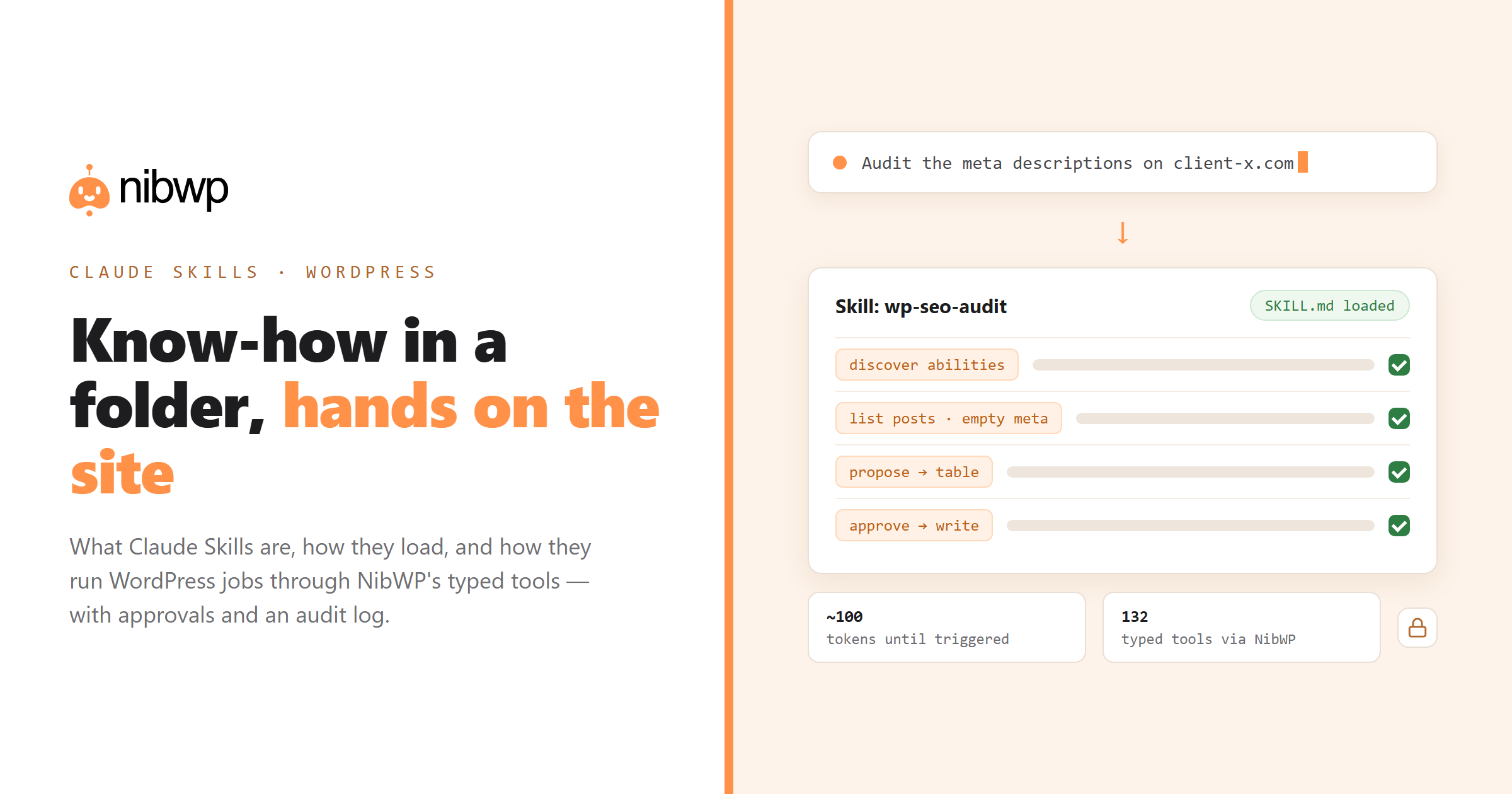
nibwp auth login https://yoursite.comfollowed bynibwp agent add claude-code. Claude Code now sees three MCP tools from the site: discover abilities, get ability info, and execute ability. Those three are the door to all 132. - Write or install a skill. Create ~/.claude/skills/wp-seo-audit/SKILL.md with a description like “Audit and fix SEO meta on a WordPress site connected through NibWP. Use when the user asks to check, backfill or rewrite titles, meta descriptions or social images.” The body says: discover the SEO abilities first, list posts with empty meta, propose new values from each post's content, present them as a table, and only write after explicit approval.
- Ask for the job. “Audit the meta descriptions on client-x.com.” Claude matches the request to the skill's description, reads the body, and follows it — calling NibWP's read tools to gather the facts before proposing a single change.
- Approve. NibWP shows the plan: which posts, which fields, old value and new. Nothing is written until you say yes; destructive actions need a scope an ordinary token does not have.
- Done, logged. The writes land through WordPress's own APIs and every call sits in NibWP's audit log, per site and per user — which is the accountability trail you hand a client.
The same loop works from Cursor, Windsurf and other MCP clients that support skills-like instructions; see which AI clients work with WordPress MCP for the per-client setup.
Why WordPress is unusually good territory for skills
Most WordPress work is the same job done on many sites. That is exactly what skills are for.
- Repetition across sites. An agency runs the same care-plan audit on forty sites a month. Written once as a skill, it runs the same way on all forty — and improves everywhere when you improve the file.
- House conventions that matter. How you name ACF fields, which builder classes are allowed, what a handoff doc contains. Skills are where conventions live so you stop explaining them in every chat.
- Plugins with their own grammar. WooCommerce variations, Bricks global classes, Breakdance node trees, WPML translation status. A skill encodes the right sequence of NibWP tool calls for each, so the agent does not rediscover it under pressure.
- Safety procedures. Snapshot before a bulk write, run in draft mode, check the audit log after. A skill makes the careful path the default path.
Claude Skills and NibWP Pro Skills are different things
NibWP also has something called Pro Skills — and the name overlap is worth clearing up before you buy either. A Claude Skill is a client-side instruction file you or anyone can write. A NibWP Pro Skill is a server-side, licensed workflow that runs inside the plugin: EtchWP Pro, Bricks Pro, Elementor Pro, Kadence Pro, Breakdance Pro, Voxel Pro, ACSS Pro, Figma Pro, and the Tutor LMS course builders. They take a design or a brief and produce validated, native builder output — checked on the server for BEM grammar, token mapping and element whitelists before a single block is written, with mandatory routing and preflight tokens so an agent cannot bypass the validation (the Skills v2 design explains why). They work with any MCP client, Claude or not.
They compose well: a Claude Skill can say “for design-to-page work on this site, route through the Etch Pro Skill and do not hand-write markup.” The Claude Skill is the how-we-work layer; the Pro Skill is the validated production layer. We compare the two — and plain MCP tools — in detail in a separate post.
A minimal WordPress skill you can copy
This is a complete, working skill for Claude Code. Save it as ~/.claude/skills/wp-content-audit/SKILL.md on a machine where Claude Code is connected to a NibWP site.
---
name: wp-content-audit
description: Audit a WordPress site connected through NibWP for thin, stale or orphaned content. Use when the user asks for a content audit, a cleanup list, or which posts to update, merge or remove.
---

# WordPress content audit

1. Call the NibWP discover tool with the query "list posts" and "list pages" and note the exact ability names.
2. List all published posts and pages with word count, last modified date and inbound links.
3. Flag: under 300 words; not modified in 18 months; zero inbound links; duplicate titles.
4. Present one table sorted by traffic risk, with a recommended action per row (update / merge / noindex / delete).
5. Do NOT write anything. If the user approves actions, hand off to the wp-seo-audit skill for meta changes and ask before any delete.
Notice what the skill does and does not contain. It names the job, the trigger, the order of operations and the stop line. It does not contain credentials, site URLs or tool schemas — those come from the NibWP connection, which the skill discovers at run time. That separation is what lets one skill run on every site you manage.
Security: treat skills like software
Anthropic's guidance is blunt and correct: only use skills from sources you trust. A skill is instructions plus, optionally, code; a malicious one can direct Claude to call tools or run scripts in ways that have nothing to do with its stated purpose. On a WordPress site with write access, that is a real risk.
- Read every file in a skill before installing it — SKILL.md, scripts, references. Look for network calls and tool use that do not match the description.
- Give the connection the least scope it needs. NibWP tokens are scoped (read, write, manage, files, code); a read-only token lets a skill look but never change, which is the right default for audits.
- Keep approvals on. A skill that says “apply without asking” should not get the chance; NibWP's approval gate and audit log exist precisely so that no instruction file can bypass them.
- Snapshot before bulk writes. The NibWP CLI has nibwp snapshot create and nibwp snapshot restore for exactly this.
Where to go next
If you want the hands-on version: using Claude Skills with NibWP to build pages from a brief walks through a complete build. To write your own, the SKILL.md tutorial for WordPress goes line by line. For ready-made ideas, see 10 Claude Skills every WordPress agency should install, and for the naming confusion, Claude Skills vs MCP tools vs Pro Skills. The connection itself takes five minutes: the WordPress plugin that lets Claude build sites and pricing.
FAQ
What are Claude Skills in one sentence?
Folders of instructions — a SKILL.md with a name, a description and step-by-step guidance, plus optional files and scripts — that Claude loads automatically when a request matches the description, so you do not have to repeat the same guidance in every conversation.
Do Claude Skills work with WordPress?
Yes, indirectly. A skill is knowledge, not access; to act on a WordPress site Claude needs tools, which come from an MCP server like NibWP. The skill tells Claude how to do the job, NibWP provides the typed tools, approval gate and audit log it does the job with.
Are Claude Skills the same as NibWP Pro Skills?
No. Claude Skills are client-side instruction files anyone can write. NibWP Pro Skills are licensed, server-side workflows (EtchWP, Bricks, Elementor, Kadence, Breakdance, Voxel, ACSS, Figma Pro and the Tutor LMS builders) that produce validated builder output from a design or brief. They work together: a Claude Skill can route design work through a Pro Skill.
Where do I put a skill in Claude Code?
Personal skills go in ~/.claude/skills/<name>/SKILL.md and apply to every project; project skills go in .claude/skills/<name>/SKILL.md and apply to that repository. Claude Code picks up changes live, and you can invoke a skill directly with /name.
Do skills sync between Claude Code, claude.ai and the API?
No. Each surface is separate: Claude Code reads folders on disk, claude.ai takes zip uploads per user, and the API takes uploads through /v1/skills per workspace. Keep the skill folder in git and deploy it to each surface you use.
Is it safe to let a skill write to a client site?
Only with the controls on. Use scoped NibWP tokens (read-only for audits), keep the approval gate on, snapshot before bulk writes, and audit any skill you did not write yourself. A skill cannot bypass NibWP's approvals or audit log.