Claude Skills vs MCP tools vs Pro Skills: which one do you need for WordPress?
Three things now carry the word “skill” or sit next to it in a WordPress AI stack, and they are not interchangeable: Claude Skills (Anthropic's SKILL.md instruction folders), MCP tools (the typed functions an AI client calls on your site), and NibWP Pro Skills (licensed, server-side workflows that produce validated builder output). People buy the wrong one, or assume one replaces another, because the names overlap. This post separates them — what each is, what it can and cannot do, who writes it, where it runs, what it costs — and then answers the practical question: for the WordPress jobs you actually have, which do you need?
Short version, before the detail: MCP tools are the hands, Claude Skills are the know-how, Pro Skills are the specialist machines. Most agencies end up with all three, and they compose cleanly. The mistakes are expecting know-how to act, expecting hands to know the procedure, or buying a machine for a job that just needs hands.
MCP tools: the hands
The Model Context Protocol is the standard way an AI client connects to an external system. An MCP server exposes tools — functions with a name, a description and a JSON schema — and the model calls them. On WordPress, NibWP is the MCP server: install the plugin and the site exposes 132 typed tools across core WordPress and 35+ plugin integrations (WooCommerce, ACF, the builders, the SEO plugins, forms, LMS, multilingual), every write behind an approval gate and in an audit log. The ability reference lists all of them.
- What they are: capability. List posts. Create a product with variations. Read the Breakdance node tree. Set a meta description. Each is one typed, permissioned, logged operation.
- Who makes them: the server — NibWP ships them; they update with the plugin. You do not write MCP tools to use WordPress; you connect to them.
- Where they run: on your WordPress server, called from any MCP client — Claude Code, Claude desktop, Cursor, Windsurf, ChatGPT, or the NibWP CLI from a terminal.
- What they cannot do: know your procedure. A tool does what it is told; it does not know that you always snapshot first, that drafts never publish, or that your cards use the harbor-card class. That is the skill layer's job.
- Cost: part of NibWP Pro and the Bundle; free tier covers the core.
Claude Skills: the know-how
A Claude Skill is a folder with a SKILL.md: YAML frontmatter (name, description) and a body of procedural instructions, plus optional reference files and scripts. Claude loads the metadata always, the body when a request matches the description, and the files only when referenced — progressive disclosure. They live in ~/.claude/skills/ or a project's .claude/skills/ in Claude Code, as zip uploads on claude.ai, and through /v1/skills on the API; the surfaces do not sync. Full explainer: what Claude Skills are and how they work with WordPress.
- What they are: procedure and convention. “Outline first, then stop.” “Read tokens before building.” “Never write inline styles.” “Report in this template.” The house way of doing a job, kept on disk instead of re-typed.
- Who makes them: you, or anyone — they are text files. Anthropic ships a few; agencies write their own. Treat third-party ones like software and audit them.
- Where they run: inside the Claude client. A skill tells Claude what to do; Claude then calls MCP tools to do it. Claude Code gives extra control — manual-only (disable-model-invocation), pre-approved tools for the turn (allowed-tools), subagent execution (context: fork).
- What they cannot do: touch the site. A skill with no MCP connection is advice. A skill also cannot validate output server-side or stop a determined model from taking a shortcut — it is guidance, followed well by a good model, but still client-side text.
- Cost: free to write; your time. Claude Code, claude.ai and API surfaces have their own plans.
NibWP Pro Skills: the specialist machines
A NibWP Pro Skill is a licensed workflow that runs inside the plugin on your server. Where an MCP tool does one typed operation, a Pro Skill packages a whole expert job with validation built in: EtchWP Pro, Bricks Pro, Elementor Pro, Kadence Pro, Breakdance Pro and Voxel Pro turn a screenshot, Figma frame, URL or HTML into native, validated builder output; ACSS Pro generates an Automatic.css token configuration from a design; Figma Pro reads frames with their auto-layout and Variables; the Tutor LMS Builder and Course Mini-site skills turn source material into a full course and its sales page. Install from NibWP › Pro Skills with a Pro or Bundle license, then invoke by prompt from any MCP client.
- What they are: validated production. Output is checked on the server — BEM grammar, token taxonomy, element whitelist, no clamp() font-sizes, course structure — before a single block is written. The agent synthesises; the server validates and writes.
- Who makes them: NibWP. They are code, not text; they register their own abilities and update with the plugin.
- Where they run: on your WordPress server, callable from Claude, Cursor, ChatGPT or the CLI alike — they are client-agnostic.
- How they are enforced: Skills v2 added mandatory routing (design-to-builder intents must pass through the skill — raw markup is refused), single-use preflight tokens bound to user and skill (the persist step rejects anything without one), and server-side validation. An agent cannot skip the guardrails even if it wants to.
- What they cannot do: know your agency's procedure around the build — which pages, in what order, what to do first. That is the Claude Skill's job. And they are scoped to their domain: a Bricks Pro Skill does not audit your SEO.
- Cost: licensed add-ons, part of Pro and the Bundle; see pricing and the skill packs.
Side by side
The same six questions, answered for each:
- What is it? MCP tool: one typed operation. Claude Skill: a procedure in a file. Pro Skill: a validated expert workflow on the server.
- Who writes it? MCP tool: NibWP. Claude Skill: you. Pro Skill: NibWP.
- Where does it run? MCP tool: your server. Claude Skill: the Claude client. Pro Skill: your server.
- Which clients? MCP tool: any MCP client. Claude Skill: Claude surfaces (Claude Code, claude.ai, API). Pro Skill: any MCP client.
- Can it write to the site? MCP tool: yes, with approval and scope. Claude Skill: no — it instructs Claude to call tools. Pro Skill: yes, after server-side validation and a preflight token.
- Validation? MCP tool: schema check. Claude Skill: none — guidance only. Pro Skill: domain validation before persist.
- Price? MCP tool: in NibWP free/Pro. Claude Skill: free. Pro Skill: Pro/Bundle license.
Which one do you need? By job
- “List the last ten orders” / “publish this draft” / “add a redirect.” MCP tools alone. Connect NibWP, ask, approve. No skill needed for a one-off.
- “Run our monthly care audit the way we always do.” MCP tools + a Claude Skill. The procedure is yours; the tools are NibWP's. See the SKILL.md tutorial — the example there is exactly this.
- “Turn this screenshot into a Bricks section.” MCP tools + a Pro Skill. This is design-to-builder output, where agents love to fall back to flattened HTML; the Pro Skill validates and enforces. A Claude Skill on top is optional but useful to say “always route through Bricks Pro.”
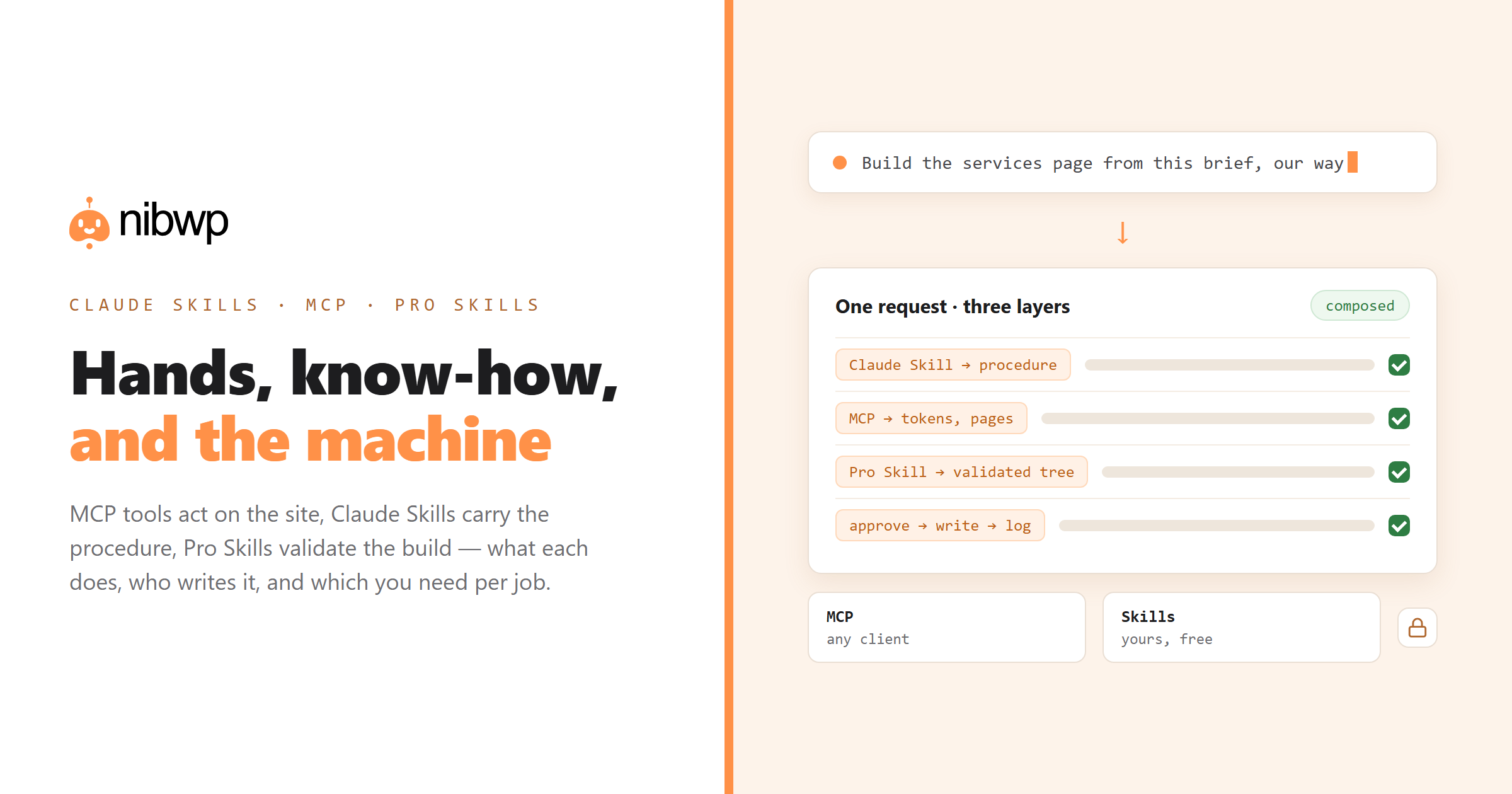
- “Build the five-page site from this brief, our way.” All three. Claude Skill for the procedure (outline, order, checks), Pro Skill for each page's validated build, MCP tools for everything around it — menus, forms, SEO meta. The page-from-brief walkthrough shows the composition.
- “Import 500 products from this sheet.” MCP tools + a Claude Skill (mapping, collision checks, batches). No Pro Skill — there is no design to validate.
- “Convert this Figma file into our Etch components using our ACSS tokens.” Pro Skills (Figma Pro + EtchWP Pro, ACSS read) + MCP tools, with a Claude Skill for the project's ordering if it is more than one frame.
- “Make the agent know our naming conventions whenever it builds.” A Claude Skill marked user-invocable: false — background knowledge. Nothing else will do this.
How they compose in practice
A real run, end to end: you type “build the services page for Harbor Plumbing from this brief” in Claude Code. The Claude Skill wp-page-from-brief fires on the description and takes over the procedure: it confirms an outline with you, then calls NibWP's discover tool (MCP) to find the builder-info and token abilities, reads them (MCP), sees the Bricks Pro Skill is installed (MCP: skill-preflight), and routes the build through it (Pro Skill) with the approved outline and the token summary. NibWP validates the element tree on the server, mints the preflight token, shows you the plan, and — on your yes — writes the draft (MCP, logged). The Claude Skill then reads the page back (MCP) and reports. Three layers, one conversation, every write approved and logged.
Remove any one layer and something degrades. No Claude Skill: you steer every step by hand and the order drifts between sites. No Pro Skill: the page may arrive as flattened markup you clean up in the builder. No MCP: nothing happens at all.
Four things people get wrong
- “Claude Skills replace MCP.” They cannot — a skill has no way to touch a site. Anthropic positions them as complementary: skills are expertise, MCP is connection.
- “Pro Skills are just Claude Skills NibWP wrote.” No. Pro Skills are server-side code with validation and enforcement, client-agnostic and licensed. A Claude Skill is client-side text. You can write a Claude Skill that uses a Pro Skill; you cannot write a Claude Skill that is one.
- “If I have Pro Skills I don't need to write anything.” Pro Skills cover design-to-build and course-build jobs superbly and nothing else. Your procedures — audits, imports, content, handoffs, house rules — are yours to write, and they are cheap to write.
- “MCP tools are enough; I'll just prompt carefully.” For one-offs, yes. For the jobs you do forty times a month, the careful prompt is a skill you keep re-typing. Write it down once.
The bottom line
Connect the site (MCP — NibWP, five minutes via the WordPress plugin that lets Claude build sites). Write your procedures as Claude Skills — start with the ten every agency should install. Add the Pro Skills for the builders you sell, because design-to-build is where validation pays for itself. That is the whole stack, and each layer does the one thing the others cannot. Plans and the Bundle are on the pricing page.
FAQ
Are Claude Skills and NibWP Pro Skills the same thing?
No. Claude Skills are Anthropic's client-side SKILL.md instruction folders that anyone can write. NibWP Pro Skills are licensed, server-side workflows inside the plugin that produce validated builder or course output and work from any MCP client. A Claude Skill can route work through a Pro Skill; it cannot replace one.
Do I need Claude Skills if I already use NibWP?
Not for one-off tasks — MCP tools and a prompt are enough. For jobs you repeat across sites (audits, imports, page builds in your house style), a Claude Skill turns the careful prompt into a file you never re-type.
Do Pro Skills work with Cursor or ChatGPT, or only Claude?
Any MCP client. Pro Skills run on your server and expose their abilities over MCP; Claude Code, Claude desktop, Cursor, Windsurf, ChatGPT and the NibWP CLI can all invoke them. Claude Skills, by contrast, are specific to Claude surfaces.
Can a Claude Skill write to my WordPress site directly?
No. A skill instructs Claude; Claude calls NibWP's MCP tools; NibWP gates every write behind approval, scope and the audit log. The skill layer never bypasses that.
What does each cost?
MCP tools are part of NibWP (free tier covers core; Pro adds the integrations). Claude Skills are free — you write them. Pro Skills are licensed add-ons included with Pro plans and the Bundle; see the pricing page.
Which should I set up first?
MCP — connect the site. Then one Claude Skill for your most repeated job. Then the Pro Skill for the builder you deliver in. Each step is useful on its own; together they are the full stack.